PDF accessibility lawsuit filings are no longer a rare courtroom event — they are one of the fastest-growing categories of digital compliance litigation in the United States. If your business publishes menus, forms, annual reports, or application documents as PDFs, you may be closer to legal exposure than you think.
This guide breaks down what the law says, who is getting sued, and how to protect your organization before a demand letter lands in your inbox.
What Makes a PDF “Inaccessible”?
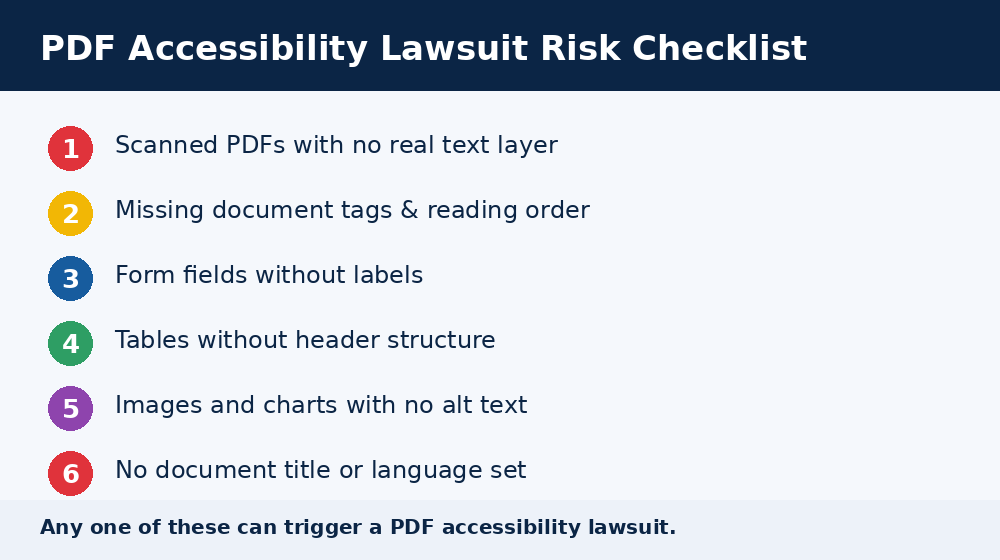
An inaccessible PDF is one that a screen reader cannot properly interpret. Common culprits include scanned images with no text layer, missing tags, undefined reading order, untagged tables, and form fields with no labels.
These may look fine visually, but for someone using assistive technology, the document is effectively locked. That gap is exactly what fuels legal action.
Who Is Most Likely to Face a PDF Accessibility Lawsuit?
Not every business faces equal risk, but the pool of targets keeps widening. E-commerce and retail sites remain the most frequently named defendants, since product catalogs, warranties, and return policies are often published as PDFs.
Restaurants, healthcare providers, financial services firms, and hospitality brands have all seen a rise in claims too. Repeat litigation is common: many defendants named in a new filing had already faced a similar complaint and never finished remediating their documents.
If your organization publishes any downloadable PDF — a menu, a rate sheet, an intake form, a benefits summary — you are part of the potential pool of defendants.
Can You Really Be Sued for an Inaccessible PDF?
Yes. Courts have consistently treated PDFs published on a website as “web content,” which means they fall under the same accessibility obligations as the site itself. If your PDF isn’t accessible, you can be named in a digital accessibility lawsuit right alongside claims about broken navigation menus or missing alt text.
ADA Title III and Private Businesses
Under Title III of the Americans with Disabilities Act, private businesses that operate as “places of public accommodation” must offer equal access to goods, services, and information. Federal courts across the country have accepted the argument that a website — and the documents hosted on it — must be usable by people with disabilities.
Website accessibility litigation has grown every year since 2017, and PDF and document-related complaints are increasingly bundled into these filings. Plaintiffs’ firms often review a company’s site, flag inaccessible PDFs among other barriers, and send a demand letter before filing suit.
ADA Title II and Government PDFs
State and local government agencies face an even clearer standard. The Department of Justice’s 2024 update to ADA Title II formally requires public entities to make digital content, including PDFs, forms, and reports, conform to WCAG 2.1 Level AA. Large agencies face compliance deadlines in 2027, with smaller entities following a year later.
Failing to meet this standard can trigger DOJ investigations, civil penalties, and citizen-filed lawsuits, on top of remediation costs.
The Numbers Behind PDF Accessibility Lawsuit Risk
Digital accessibility litigation has climbed sharply, with thousands of federal filings recorded annually and website-related claims now making up more than a third of all ADA Title III cases. A significant share of recent defendants had already been sued once before and hadn’t fully fixed the underlying issues.
Settlement and legal defense costs for a single case can run into tens of thousands of dollars, even before factoring in remediation, reputational damage, and lost customers. For many businesses, a proactive PDF accessibility lawsuit prevention plan costs far less than a single settlement.
What the Law Actually Says
No single statute names “PDF” directly. Instead, courts and regulators rely on broader frameworks:
- ADA Title III covers private businesses offering goods and services to the public, including e-commerce and hospitality.
- ADA Title II governs state and local government entities and now explicitly names WCAG 2.1 AA as the technical standard.
- Section 508 requires federal agencies and contractors to meet accessibility standards for electronic documents.
- WCAG (Web Content Accessibility Guidelines), published by the World Wide Web Consortium, is the technical benchmark referenced across nearly every accessibility law and lawsuit.
Judges increasingly point to WCAG conformance as evidence of a “good faith” accessibility effort, even where the underlying statute doesn’t name it explicitly.
How to Protect Your Business from a PDF Accessibility Lawsuit
- Audit existing PDFs. Identify untagged, scanned, or poorly structured documents across your website.
- Remediate high-traffic files first. Prioritize forms, contracts, and frequently downloaded reports.
- Add proper tags and alt text. Every image, heading, and table needs a structured, readable equivalent.
- Test with real assistive technology. Automated checkers catch some issues, but screen reader testing catches more.
- Document your compliance process. A documented accessibility program can reduce risk and demonstrate good faith if a complaint arises.
Frequently Asked Questions
Does every PDF on my website need to be accessible?
Generally, yes, if it’s publicly available and used to deliver information, services, or transactions. Purely archival or internal-only files carry lower risk, but public-facing documents are the ones plaintiffs’ firms review first.
Can a small business really get sued over one PDF?
Yes. Company size doesn’t exempt a business from ADA Title III obligations, and small and mid-sized businesses are sued regularly, often after a single complaint from an advocacy organization or individual.
How fast can I reduce my risk?
An initial audit typically takes days, not months. Prioritizing your most-viewed documents first lets you show measurable progress quickly while a full remediation plan is completed.
Handling this internally can be time-consuming, especially at scale. That’s where a specialist partner helps: Rapson Technologies’ digital accessibility services can audit, remediate, and monitor your PDFs and website so you’re not left guessing whether your documents meet WCAG and ADA requirements.
Final Thoughts
A PDF accessibility lawsuit is a real and growing risk, not a hypothetical one. Plaintiffs’ firms are actively scanning websites for inaccessible documents, and regulators are tightening standards for public entities. The good news is that the fix is well understood: tagged, structured, WCAG-conformant PDFs.
Don’t wait for a demand letter to find out where your documents stand. Reach out to Rapson Technologies today for a professional accessibility audit and take the uncertainty out of PDF compliance.
Reduce Your Legal Risk” free audit ?
Talk to Rapson Technologies’ accessibility experts today.
