Cloud repatriation 2026 has become the conversation every CFO and CIO is quietly having in budget review meetings. After a decade of “cloud-first” mandates, finance leaders are now asking a harder question: is the public cloud actually the cheapest place to run every workload, or did we just assume it was?
This is not an anti-cloud argument. It is a call for honesty about where cloud repatriation 2026 genuinely makes sense, and where it doesn’t. At Rapson Technologies, we don’t sell cloud contracts or hardware. We sell clarity, built from real usage data rather than vendor slide decks.
What Is Cloud Repatriation, and Why 2026?
Cloud repatriation simply means moving applications, data, or infrastructure from public cloud providers back to on-premises or private data centers. It is the mirror image of the migration wave that dominated the last ten years.
Three forces have pushed cloud repatriation 2026 to the top of the agenda:
- Egress and storage costs have compounded quietly for years, often invisible until an annual audit.
- AI workloads have introduced GPU pricing that makes steady-state compute painfully expensive at cloud rates.
- Interest rates and tighter capital scrutiny mean every recurring line item, including cloud spend, gets re-examined.
Cloud Repatriation vs Migration: Knowing the Difference
It helps to separate cloud repatriation vs migration clearly, because leadership teams often conflate the two. Migration is the one-way move toward cloud elasticity, scalability, and reduced capital expenditure. Repatriation is a deliberate, selective move in the opposite direction for specific, well-understood workloads.
Nobody serious is suggesting a wholesale return to on-premises computing. The real conversation around cloud repatriation vs migration is workload placement, not ideology. Some applications belong in the cloud permanently. Others were only ever there because migration was the default instruction years ago.
When to Repatriate Cloud Workloads: The Real Triggers
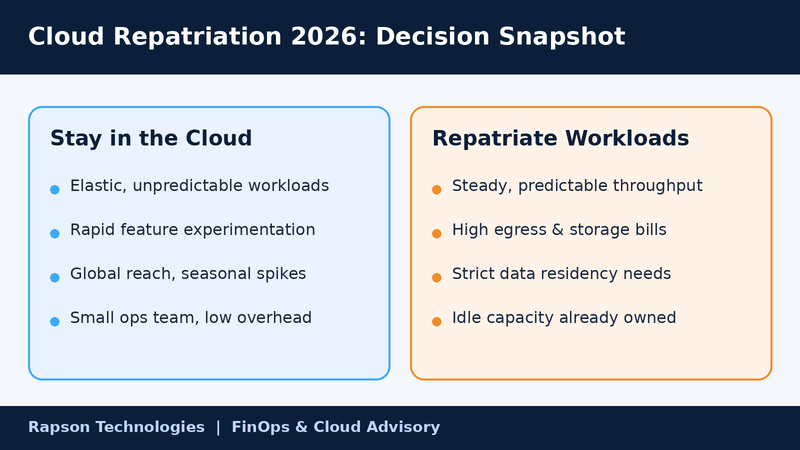
Knowing when to repatriate cloud workloads starts with data, not intuition. Here are the patterns that consistently show up in our client assessments:
1. Predictable, steady-state workloads. If compute usage barely fluctuates month to month, you are paying a premium for elasticity you never use.
2. Data-heavy, low-change applications. Large datasets with high storage and egress charges but low transaction growth are classic repatriation candidates.
3. Compliance and data residency pressure. Certain regulated industries increasingly require data to sit within specific physical boundaries.
4. Underused reserved capacity elsewhere. If your organization already owns data center space or leased colocation, idle capacity changes the math instantly.
5. Multi-year cost trend lines. When your cloud bill has grown faster than your business volume for two or more consecutive years, that gap deserves scrutiny.
6. Application maturity. Legacy, stable systems with few architectural changes rarely benefit from cloud-native flexibility.
7. Vendor lock-in fatigue. Rising renewal quotes with limited negotiating leverage often accelerate the decision to repatriate.
None of these signals alone should trigger a move. Together, across a full workload inventory, they build a defensible case.
Moving Workloads Back On-Premise: What It Actually Costs
Moving workloads back on-premise is not free, and any advisor who tells you otherwise is not being straight with you. Hardware procurement, staffing, data center space, and migration labor all carry real upfront cost.
The financial case only holds up over a three-to-five-year horizon in most scenarios. A rushed decision to repatriate everything because of one bad invoice usually costs more than it saves. This is precisely why cloud repatriation 2026 requires modeling, not reaction.
Independent venture capital research from Andreessen Horowitz, in its widely cited “Cost of Cloud” analysis, made a similar argument: cloud economics that look brilliant in a company’s early years can quietly turn into a growth tax later on, once scale changes the math. That research helped popularize the idea that repatriation, done selectively, can materially improve margins for infrastructure-heavy businesses.
Hybrid Cloud Strategy Cost Savings: The Middle Path
For most organizations, the destination is not full repatriation. It is a deliberate hybrid cloud strategy cost savings model, where predictable workloads run on owned or colocated infrastructure and bursty, experimental, or customer-facing workloads stay in the public cloud.
A well-built hybrid cloud strategy cost savings plan typically delivers three benefits at once:
- Lower total cost of ownership on stable workloads
- Continued access to cloud-native tools for innovation
- Reduced single-vendor dependency risk
The goal is workload-to-platform fit, not a return to 2010-style data centers.
How Cloud Cost Optimisation Consulting Changes the Equation
This is where independent cloud cost optimisation consulting earns its keep. Most cloud providers, resellers, and even many managed service partners are financially incentivized to keep every workload exactly where it already sits.
Rapson approaches this differently. We are not paid more when you stay in the cloud, or when you leave it. Our role is to build the workload-by-workload cost model that tells the truth, backed by usage telemetry rather than assumption.
If your organization is weighing a broader move, our cloud migration management team can also help you plan the reverse journey with the same rigor we apply to migrations, ensuring architecture, security, and downtime risk are handled properly either direction.
The Rapson Approach: Data Before Decisions
Every engagement starts the same way: a full workload audit, real cost-per-workload benchmarking, and a plain-English report comparing cloud, on-prem, and hybrid scenarios side by side. No slideware, no bias toward a single outcome.
CFOs get the financial model. CIOs get the technical risk assessment. Both get a shared, defensible answer instead of two competing narratives.
Conclusion: Make the Decision With Data, Not Pressure
Cloud repatriation 2026 is not a trend to follow blindly, and it is not something to dismiss out of fear of complexity. It is a financial and technical decision that deserves the same rigor your original migration once received.
Some workloads should absolutely stay in the cloud. Others are quietly costing you more than an on-premises alternative ever would. The only way to know which is which is to look at the actual numbers.
Ready to find out where you stand?
Talk to Rapson Technologies’ cloud experts today.
